
IFC View
Open, inspect and coordinate IFC and BIM models on Mac, iPad and iPhone.

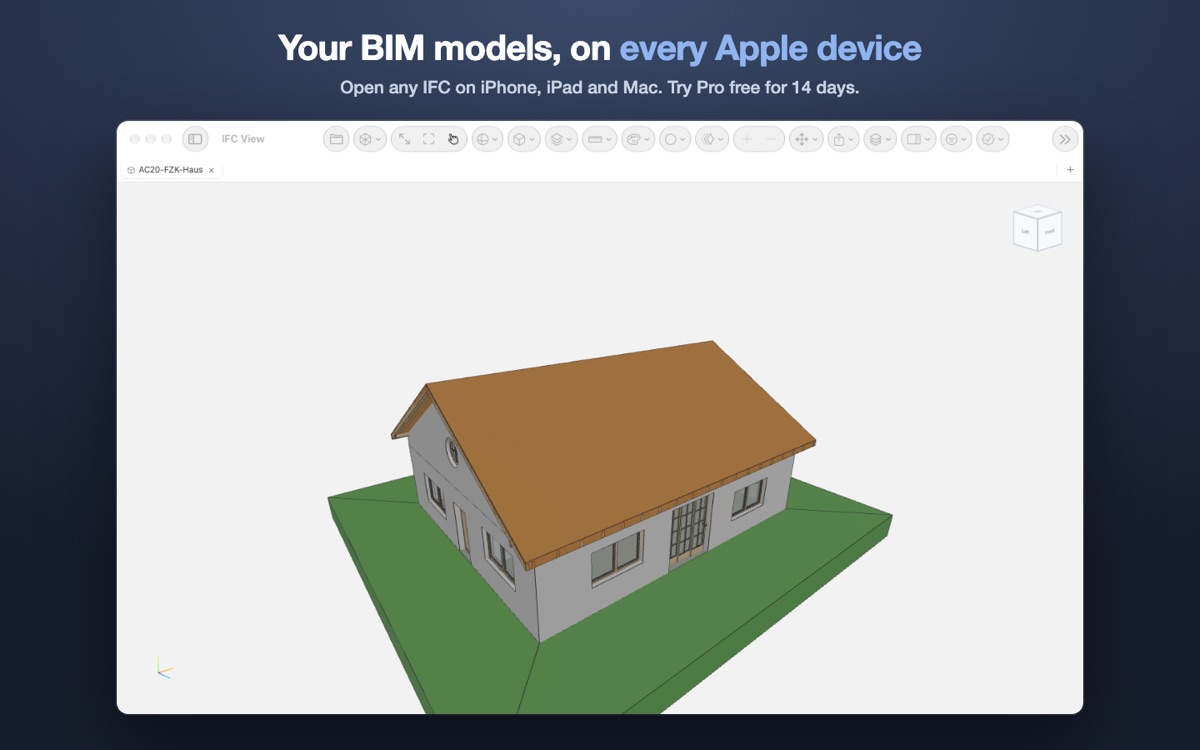
What it does
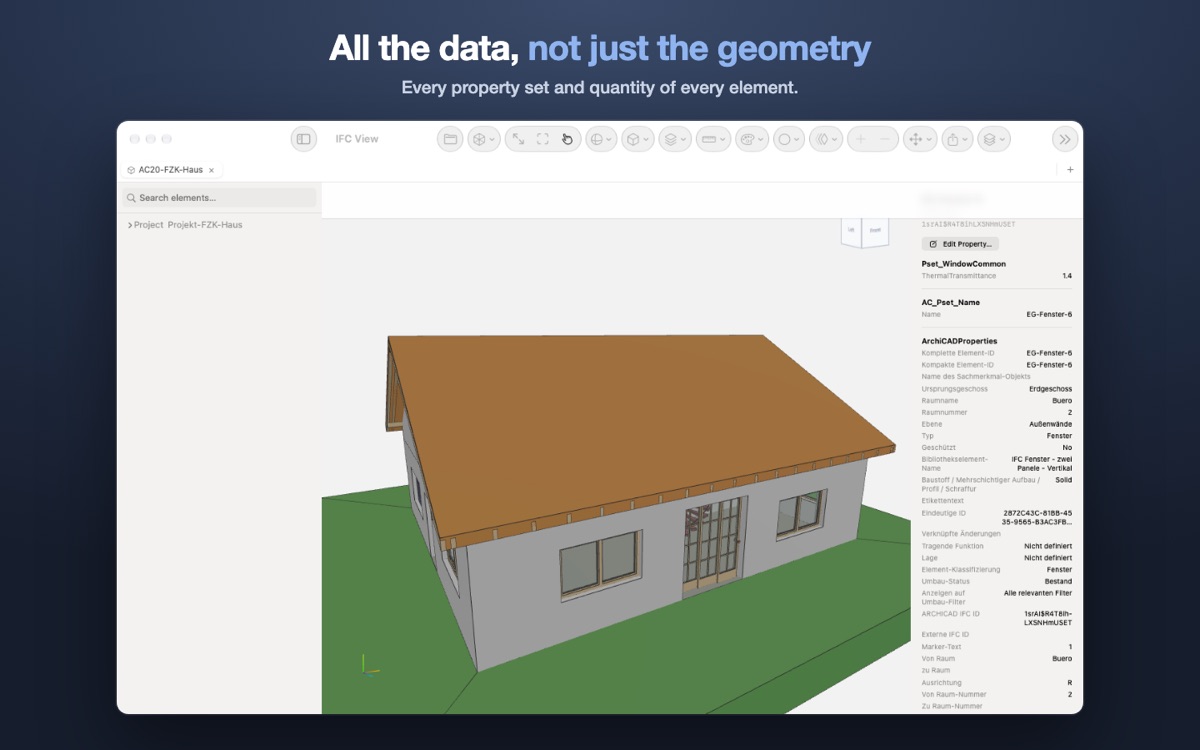
IFC View opens IFC models on the Mac, the iPad and the iPhone, whatever tool produced them: Revit, ArchiCAD, Tekla, Vectorworks, Allplan or another. The model arrives with its data intact: the object tree follows the spatial and type hierarchy, every element carries its property sets and quantities, and filters, levels and selection sets narrow a large model down to what matters. Measure distances with object snaps, cut through it on the X axis, and leave notes with photos, circles and freehand markup that stay with the model.
With Pro, the viewer becomes a coordination tool. Federate architecture, structure and services in one scene, run clash detection between them, check the model against an IDS specification, and compare two revisions to see what was added, changed or removed. Findings leave the app as BCF topics, PDF, CSV and Excel reports, a quantity take-off or a COBie workbook, and the model itself as 3D PDF, USDZ, OBJ, STL or GLB.
With Pro, the viewer becomes a coordination tool
Everything below is part of Pro, a single purchase shared across your Mac, iPad and iPhone. You can try all of it free for 14 days.
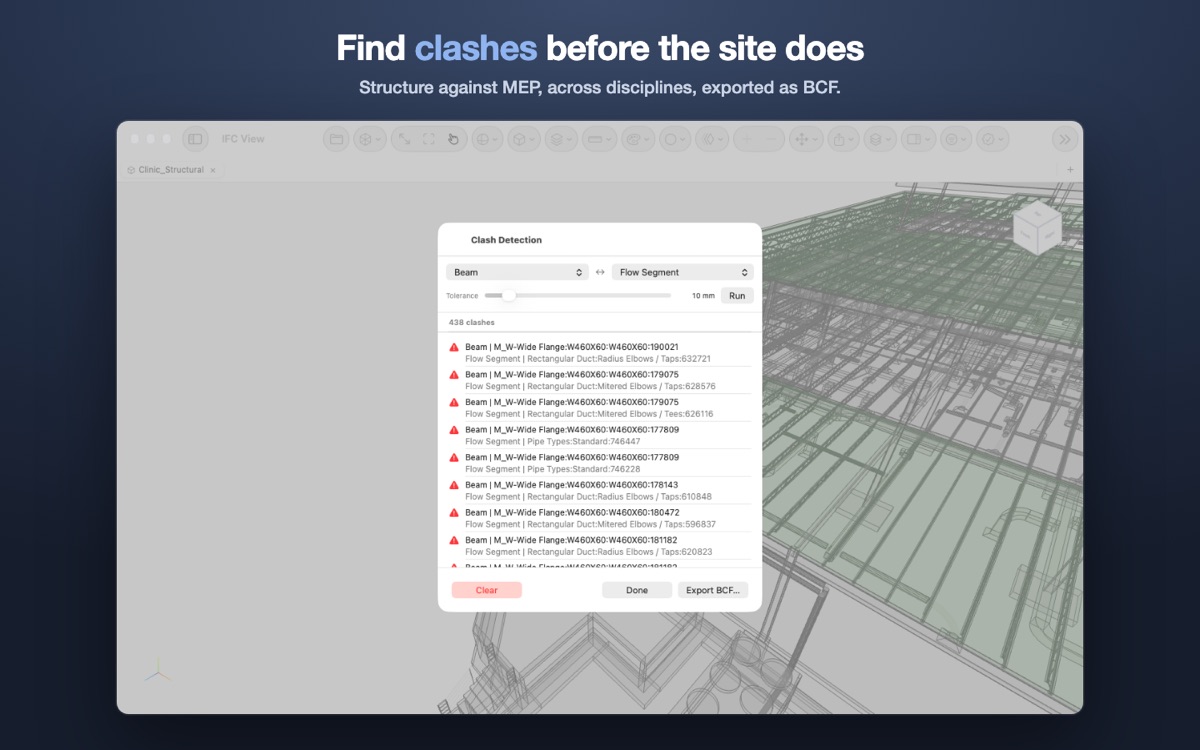
Between disciplines
Run clash detection between element types, and across disciplines once the models are federated. Each clash exports as a BCF topic.
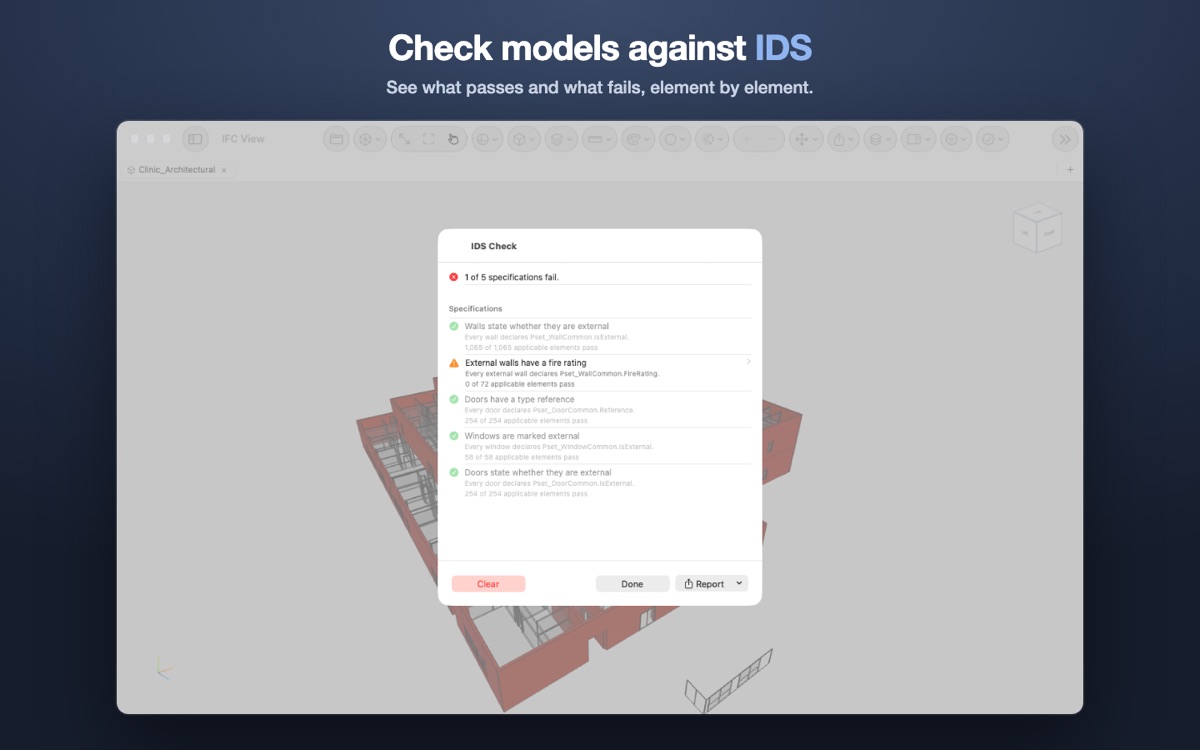
Pass or fail, element by element
Open an IDS specification and see, for each rule, how many elements pass and fail, with the failures highlighted in the model. Reports in PDF, CSV and Excel.
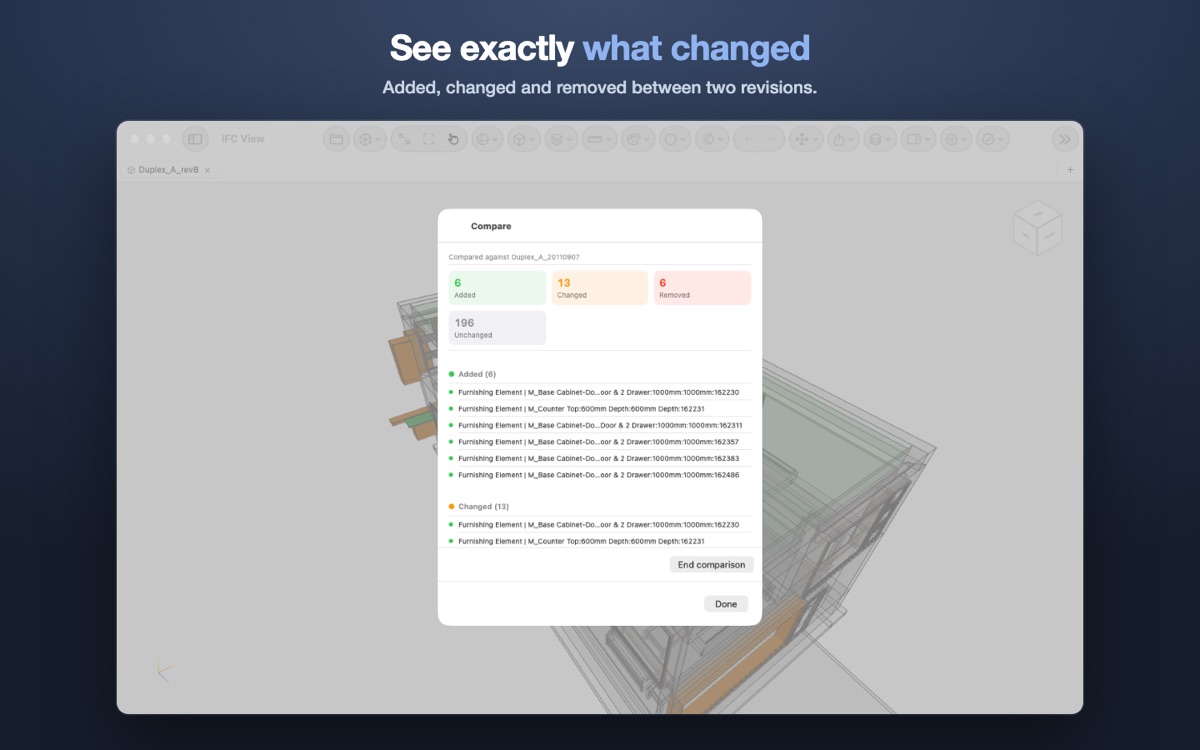
Two revisions of a model
See what was added, changed and removed between two versions of a model, and what stayed the same.
One scene, every discipline
Load architecture, structure and services together, aligned in a single scene, so disciplines can be reviewed side by side.
Colour, filter and plan
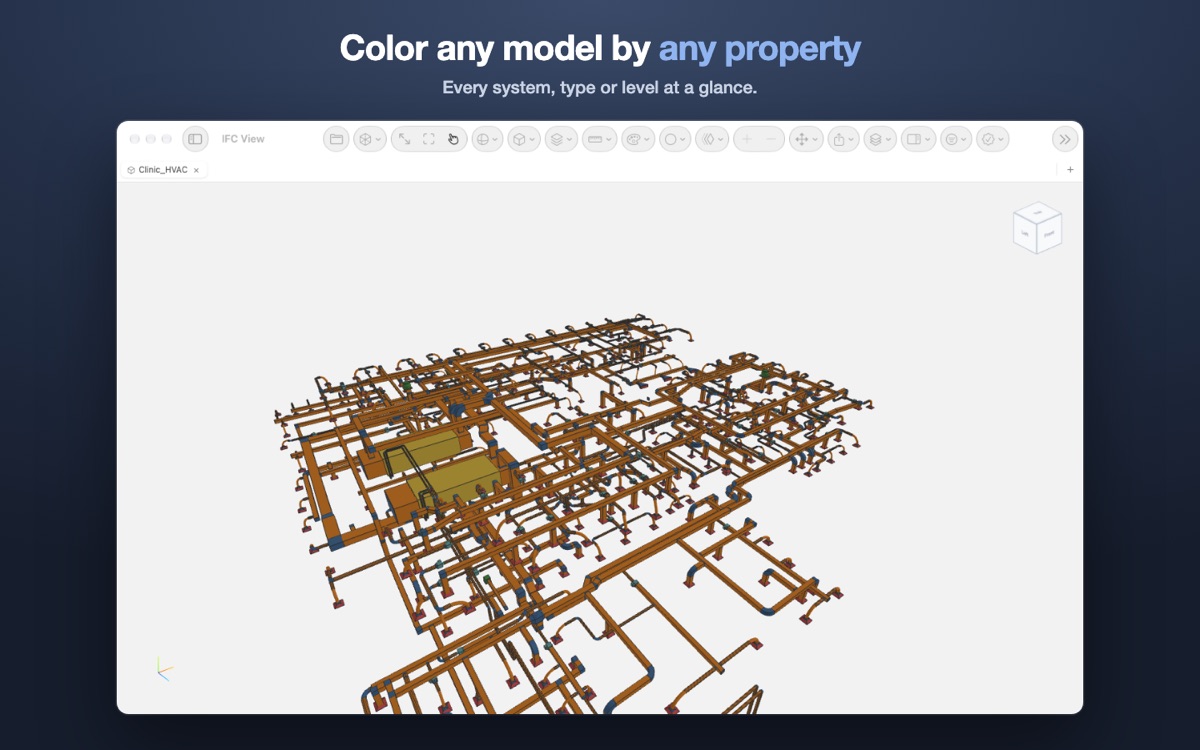
Smart views colour and hide by any property. Quantity take-off and a 4D schedule. Save views, and share one as a link or QR code that opens the same view on another device.
From finding to handing over
Edit properties and save the edited IFC. Export BCF, PDF reports, 3D PDF, USDZ for AR, OBJ, STL, GLB, CSV, Excel, COBie and a share package that opens complete on another device.
3D models: FZK-Haus (KIT Karlsruhe), and Medical-Dental Clinic and Duplex Apartment (buildingSMART International, CC BY 4.0).
Free and Pro
Everything needed to open a model, inspect it, measure distances and take notes is free. Pro is a single in-app purchase, with no subscription, shared across your Mac, iPad and iPhone through your Apple Account.
Try every Pro feature free for 14 days. The trial is taken once per Apple Account, asks for no payment details, never renews and never charges. When it ends, the app goes back to the free viewer and keeps your notes and markups. Pro is a one-time purchase: €29.99 in Portugal, and the App Store's equivalent in other countries.
| Feature | Free | Pro |
|---|---|---|
| Free: open, inspect and annotate | ||
| Models open at once | One at a time | Several, in tabs and windows |
| Open IFC, IFCZIP, GLB and IFC View packages | Yes | Yes |
| Orbit, pan and zoom; preset views, elevations, zoom window, walkthrough | Yes | Yes |
| Object explorer (spatial and type tree), search | Yes | Yes |
| Properties and quantities of each element; isolate, hide, X-ray | Yes | Yes |
| Filters, levels and selection sets | Yes | Yes |
| Grids, levels, colour by level, georeferencing | Yes | Yes |
| Measure distances, with snaps, in metres or feet and inches | Yes | Yes |
| Section plane on the X axis | Yes | Yes |
| Notes with photo, circles and freehand markup, saved with the model | Yes | Yes |
| Read BCF topics | Yes | Yes |
| Look up classifications in bSDD | Yes | Yes |
| Pro: coordinate and deliver | ||
| Section planes on the Y and Z axes | No | Yes |
| Measure areas and angles | No | Yes |
| Exploded view; global coordinate system (WCS) | No | Yes |
| Federate several models in one scene | No | Yes |
| Clash detection, also across disciplines | No | Yes |
| IDS check, with PDF, CSV and Excel report | No | Yes |
| Compare revisions | No | Yes |
| Quantity take-off and 4D schedule | No | Yes |
| Smart views (colour and visibility by property) | No | Yes |
| Save views; link and QR code for a view | No | Yes |
| Edit properties and save the edited IFC | No | Yes |
| Export BCF | No | Yes |
| Export image, PDF report, 3D PDF, USDZ (AR), OBJ, STL, GLB, CSV, Excel, COBie and share package | No | Yes |
What's new in version 1.2
- Free 14-day trial of every Pro feature
- Clash detection between element types, also across federated disciplines, with export to BCF
- IDS checking (IDS 1.0), with reports in PDF, CSV and Excel
- Revision comparison: added, changed, removed and unchanged
- Smart views, 4D schedule and property editing
- Site notes with photos, saved with each model; freehand drawing over the view
- BCF topics you can edit, comment on and export again
- Share package: model, notes, photos and views in a single file that opens complete on another device
- A link and QR code that open the same view on another device
- Export to 3D PDF, USDZ (AR), OBJ, STL, Excel and COBie
- Georeferencing (IfcMapConversion, EPSG, true north), object snaps, feet and inches
- Light or dark theme, or the system's, with the 3D area following
- Distance measurement and filters are now free
- The app in 6 languages
Formats and requirements
- Opens:
.ifc(IFC2x3 and IFC4) and.ifczipfrom any BIM tool,.glbmodels, and IFC View share packages. Also reads IDS specifications and BCF topic files. - Systems: macOS 14 or later, iPadOS 17 or later, iOS 17 or later.
- Languages: English, Portuguese, Spanish, French, German and Italian.
- Offline: every model is processed on the device. The app only goes online for the App Store purchase and, when you use it, the bSDD classification lookup.
No model at hand? Three sample models of the same building, in three disciplines, are ready to download and open together.
Common questions
Which BIM tools can it read?
Any tool that exports IFC: Revit, ArchiCAD, Tekla, Vectorworks and others. The app reads .ifc and .ifczip, and opens GLB models.
Is there a free trial?
Yes. Every Pro feature, free for 14 days, once per Apple Account. It asks for no payment details, never renews and never charges; if you don't buy, the app goes back to the free features and keeps your notes and markups.
What does Pro cost?
A single purchase, with no subscription: €29.99 in Portugal, and the App Store's equivalent in other countries. It covers your Mac, iPad and iPhone.
Can I open several models together?
Yes, with Pro. Federated loading combines several IFC files into one scene, so disciplines can be reviewed side by side, and clash detection works across them.
Does it show the IFC data or only the geometry?
Both. The object tree follows the spatial and type hierarchy, and every element carries its property sets and quantities.
Do my models leave the device?
No. Files are processed entirely on the device and are never sent to a server.